
Ness County VINELink Coverage
VINE is a custody-status and notification network. VINELink is its public search interface. The official Ness County Sheriff Department page links directly to DHS-VINE, which makes this the clearest public alert route named by the Sheriff. That link shows an official local referral. It does not prove that every Ness County Jail booking appears, that every record offers the same fields, or that past releases remain searchable.
The local jail is operated by Sheriff Brandon Mitchell’s department at 221 W Main Street in Ness City. VINELink may show data from a participating jail or corrections agency, but the agency label controls the meaning. A Ness County Jail record concerns local custody. A Kansas Department of Corrections record concerns state prison or supervision. Neither should be described as a federal result.
Search Ness County VINELink Records
Start with the official VINELink route and search only one person at a time. Names can repeat, and a correct name under the wrong agency is still the wrong record. Use the person’s full name and any booking or offender identifier supplied by the holding agency. Compare date of birth or other visible identity details before opening a result.
- Open DHS-VINE or VINELink and choose Kansas.
- Enter the full name or the offender or booking identifier offered by the search.
- Review possible matches and select the record with the right identity and agency.
- Read the exact status, agency name, and last-update information.
- Call the named custodian when the result reports release, transfer, or no current custody.
If no match appears, check spelling, aliases, and identifiers. Then contact the likely custodian. An empty search does not show that a person was released, that a record was removed, or that the agency participates. The broader Ness County released inmate search explains how the Sheriff record and court case can fill that gap.
Ness County VINELink Result Fields
A live result should be read as a group of fields, not as a single word. The exact fields vary by agency and record. Copy the wording as shown, including any time attached to the update. Do not rewrite a transfer as community release or a future date as an event that already happened.
| Field | What it establishes |
|---|---|
| Person and identifier | Helps distinguish the intended person from someone with a similar name. |
| Reporting agency | Shows which jail or corrections office supplied the status. |
| Custody status | Reports the provider’s current wording, such as custody, release, or another change. |
| Location | May identify the holder or facility associated with the record. |
| Update time | Shows when the system last reflected agency data, not necessarily the physical release time. |
| Notification option | Shows whether alerts can be registered for that exact record. |
A court order date, the jail’s physical release time, and the VINE update time can differ. The Ness County District Court may document bond, dismissal, sentence, or commitment, while the Sheriff can confirm when local custody ended. VINE reports a status change but does not replace either record.
Ness County VINE Search Screen
The Sheriff-linked DHS-VINE search is the source shown in the captured interface below.
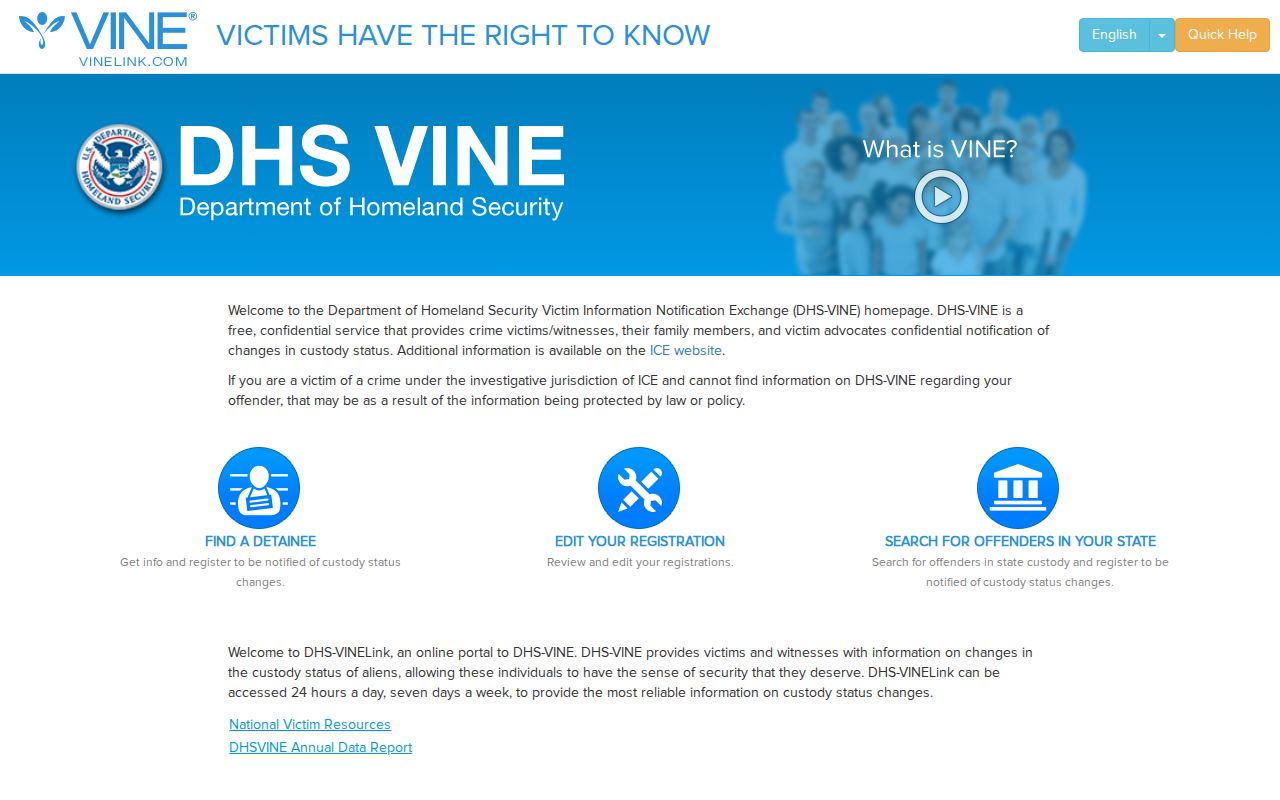
The screen is a gateway, not proof that a particular Ness County record is present. A useful result must display the right person and agency. Keep private notification details out of screenshots and notes.
Register Ness County Release Alerts
Notification begins from the exact person record, not from a general county page. Available delivery choices can vary. The research found telephone, text, or email destinations in the registration workflow, with a four-digit PIN for telephone notices. Use a destination controlled by the registrant and do not share the PIN.
- Open the verified person record and select its notification option.
- Choose one of the delivery methods offered for that record.
- Enter the telephone, text, or email destination requested on screen.
- Create the four-digit PIN when registering for telephone calls.
- Complete any text or email verification shown by the service.
- Use the PIN to acknowledge an automated call; calls may repeat until confirmed.
Save the reporting agency and record identifier. Those details make later verification easier. Do not save or publish another person’s contact destination. An alert can help with timing, yet it remains dependent on the provider’s update and does not certify the release sheet.
Sheriff-Linked Ness County VINE
Ness County has no verified online roster, current-arrests table, or recent-release feed. That makes the Sheriff’s express link to DHS-VINE locally distinctive. It supplies a public alert route even though the county website does not publish a 24-hour or 72-hour release list. The right use is a specific-person check followed by direct verification.
Participation must still be tested on the live record. The mere presence of the Sheriff’s link does not guarantee transmission of every booking. If the result names another agency, follow that agency’s record. If the result names Ness County and reports release, ask the Sheriff whether the person left for the community or was delivered to another holder.
Note: VINELink notification and Ness County TextMyGov alerts are different services with different purposes.
Confirm Ness County Release Status
For a local booking, call the Ness County Sheriff and ask a narrow question: did physical custody end, and was the event a discharge or a transfer? A court bond or dismissal entry explains legal authority but may precede jail processing. Another hold can also prevent departure. Request the booking and release sheet if verbal confirmation is unavailable.
For KDOC custody or supervision, use the KASPER disclaimer and search. KASPER updates on working days and covers a different population from a county booking. It may include identity, corrections status, conviction information, supervision data, and photographs. A KASPER record is not proof that someone was booked into or released from Ness County Jail.
Federal and immigration routes are separate. The BOP Inmate Locator covers federal prisoners and may show former federal records with a release date. The ICE detainee locator tests current immigration custody after a possible transfer; it is not a historical release archive. During federal pretrial detention, the federal court or U.S. Marshals may be the correct source. VINE should not be used to fill those scope gaps.
Ness County VINELink Limits
Database timing matters. A court may have ordered release while jail staff still process the order. VINE may update after the physical event. A person may also leave Ness County Jail yet remain in custody with KDOC, another county, federal authorities, or ICE. “No longer here” and “released to the community” are not equal findings.
If a VINE result still says in custody after an expected change, contact the reporting agency rather than calculating a release time. If it says released, record the exact wording and update time, then obtain the local release record or state discharge record. If it disappears, report only that the searched source returned no match at that time. Avoid guessing about deletion, sealing, or expungement.
A released person will often drop from a live jail view, while someone still held remains tied to the current custodian. Ness County does not publish such a roster, so there is no county web list whose disappearance can settle the issue. Ask the Sheriff for the actual release date and time, release authority, and any transfer recipient that can be disclosed. Pair that reply with the district-court case when the legal reason matters. For a KDOC commitment, wait for the state record and check KASPER. For another county, contact the receiving sheriff. This source-by-source approach prevents one system’s silence from being mistaken for proof.
Notification settings also need care. Register only on the matched record and use the channels the screen offers. A notice about transfer, location, or custody change may require a different follow-up than a notice that uses the word released. Preserve the precise term. If an automated telephone call repeats, acknowledge it with the registration PIN. Contact VINE support or the listed agency when an alert conflicts with a live official record.